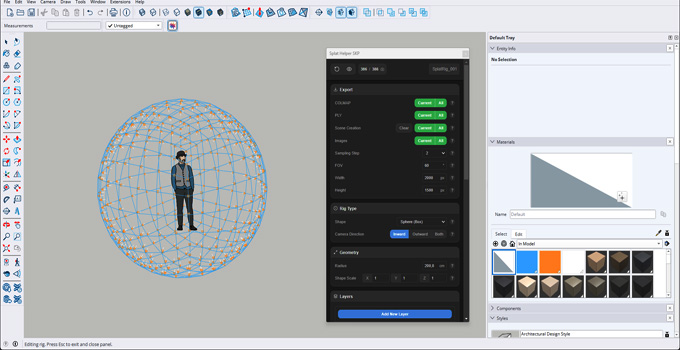
Splat Helper SKP Plugin for SketchUp
The Splat Helper SKP plugin is one of the effective plugins that has been designed to export synthetic datasets and camera data from 3D design scenes. The Splat Helper SKP plugin helps to produce clean design outputs for the splatting reconstruction and rendering process.
The Splat Helper SKP plugin can export COLMAP and point cloud data instantly from the SketchUp design model for the Gaussian splatting workflows. The Splat Helper SKP plugin has been specially designed for speed and practical production use, which helps to bring more reliable and faster Gaussian splatting preparation to the SketchUp software.
The Splat Helper SKP plugin is compatible with different versions of the SketchUp software, including SketchUp 2022, SketchUp 2023, SketchUp 2024, SketchUp 2025, and SketchUp 2026. The Splat Helper SKP plugin is compatible with the Windows operating system. The supported language for the Splat Helper SKP plugin is English. Users can purchase a license to access the design features of the Splat Helper SKP plugin for $29.99.
Discuss the design features of the Splat Helper SKP Plugin
Quick rig placement feature
The Splat Helper SKP plugin helps to place the dome-based capture rigs instantly within the SketchUp design model, which has been used for a further structured camera sampling process. This feature helps to streamline the synthetic dataset generation process for the Gaussian Splatting pipelines by handling the complex camera setups.
Rig editing feature
The Splat Helper SKP plugin also allows users to customise the camera rig settings live at any time. This design feature of the Splat Helper SKP plugin allows users to select, place and manage camera setups and helps transform the rigs directly into the design model workspace.
Image export feature
The Splat Helper SKP plugin can generate fast viewport images directly from the SketchUp viewport, which helps to achieve rapid previews.
Automatic scene creation feature
The Splat Helper SKP plugin can generate the camera-based scene data automatically, which will be used to sync the camera scenes along with the other rendering engines. Thus, the Splat Helper SKP plugin can generate individual scenes for every camera angle in the rig, thus allowing users to bridge the camera views and render data along with external software.
COLMAP export feature
The Splat Helper SKP plugin also helps to export camera-ready data that has been formatted for the COLMAP pipelines.
Density and resolution control feature
The Splat Helper SKP plugin helps to generate and tune sampling density, weight and height of the image, and helps to balance dataset quality versus export speed.
Point cloud export feature
The Splat Helper SKP plugin for SketchUp software also helps to generate the point cloud outputs for the Gaussian splatting and related reconstruction workflows.
Offering axis remap options
The Splat Helper SKP plugin for SketchUp software allows users to configure the up-axis orientation of the exported synthetic datasets. These axis remap options of the Splat Helper SKP plugin help to align the design model’s geometry to match the coordinate standard of the destination software, thus helping to achieve better compatibility with external tools.
How to download the Splat Helper SKP plugin for SketchUp software
To download the Splat Helper SKP plugin for the SketchUp software, the user needs to follow several steps, which are as follows:
1. First, the user has to go to the SketchUp Community Forums discussion page, or the user has to visit the SketchUp Extension Warehouse via their web browser.
2. In the next step, the user has to type “Splat Helper SKP” into the search bar within the SketchUp Extension Warehouse.
3. After that, the user has to click on the download button or has to click on the developer’s trial/purcase link that has been provided on the listing page.
4. In the next step, the user has to log in with their SketchUp or Trimble ID if prompted.
5. To install the Splat Helper SKP plugin after completing the download process, the user has to open the SketchUp software. Then, the user needs to go to the window and click on the Extension Manager.
6. After that, the user has to click the Install Extension button to begin the installation process.
7. The user needs to select the downloaded .rbz file for the Splat Helper SKP plugin and has to click the Open button. In the case of loading the toolbar, the user has to restart the SketchUp software. Thus, the entire download and installation process of the Splat Helper SKP plugin within the SketchUp software has been completed.