How to Install SketchUV for the SketchUp Software
Concept about SketchUV Archives
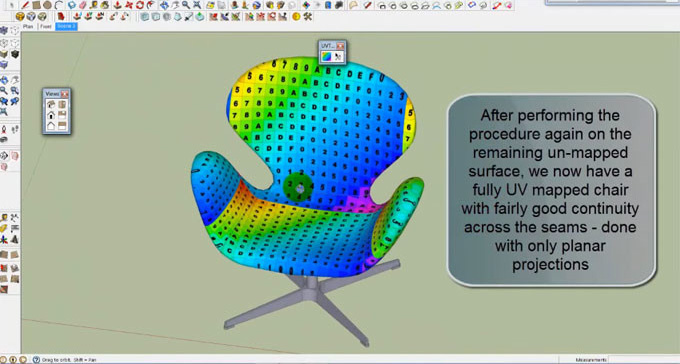
The SketchUV archives are the essential UV mapping tools for the SketchUp software, which can design spherical, planar, cylindrical, tube, and box shapes. The SketchUV is one of the powerful texture processing tools, which was originally a paid commercial plugin, and now it is free to use. The SketchUV plugin has been developed by Mind Sight Studios, which has an amazing surface handling instrument. The toolbar of the SketchUV plugin has two symbols, including the “UV Map” instrument and the “Way Selection” apparatus.
The SketchUV is compatible with the different versions of the SketchUp software, including SketchUp 2022, SketchUp 2023, SketchUp 2024, SketchUp 2025 and SketchUp 2026. The SketchUV extension is supported by both Windows and Mac operating systems.
The supporting language for the SketchUV extension is English. The SketchUV has a simple interface, which has been activated by using a combination of the toolbar button and the right-click context menu. This texture processing tool is highly useful for placing textures on furniture or complex organic design models.
Learn about the design features of the SketchUV for SketchUp software
Projection map feature
With the help of the SketchUV plugin, users are able to extend the design surface from a plane on the item. When the user needs to plan the side of an article, the planner projection feature has been utilised. This design feature is also effective for planning numerous sides and for planning different sides of the symmetric items. While utilising the projection map of the SketchUV extension, it is not necessary to change the directions ahead of time.
Column map feature
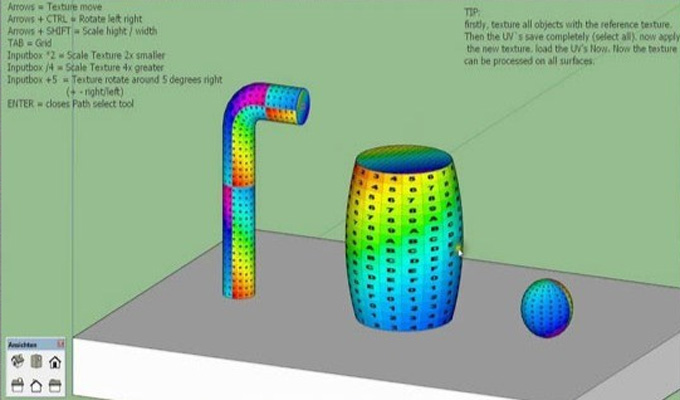
This design feature has been utilised for those design objects whose essential shape is round and hollow.
Spherical map feature
This design feature of the SketchUV plugin helps to encompass the design item by extending the guide from the circle. In the case of the design objects, whose fundamental shape is round, the circular projection has been utilised.
Box stickers feature
When the user maps on a solid shape like a box, the directions inside will not be completely joined. This issue can be tackled by the box sticker feature. The accompanying picture has a cuboid, for instance, which extends the design surface from six sides of the cuboid. Each side projection of the box is a level guide, and the impact on a superficial level relies upon the design surface.
Four-sided map feature
With the help of the SketchUV plugin, the user is able to apply a duplicate of the guide to each face of the design item. The users are able to utilise full square shape guides to plan sets of appearances, which helps to offer secret edges. Users can utilise the rectangular piece of the guide, which helps to plan a solitary face without covered-up edges.
Subdivision triangle feature
With the help of this SketchUV feature, the user is able to partition a design model into a three-sided face.
Path map feature
This design feature helps to solve the problem of road mapping.
Import and export feature
The import and export feature is the most impressive element of the SketchUV plugin. For utilising this design capacity, the user needs to download and utilise the “Roadkill UV Tool” device.
How to install SketchUV for the SketchUp software
There are various steps that need to be followed while installing the SketchUV extension for the SketchUp software, which are as follows:
1. To initiate the installation process, the user must have SketchUp 8 M2 software.
2. At first, the user has to go to the Window in SketchUp software, then select Preferences, and then has to go to the Extensions option.
3. The user has to click on the “install extension” button in the next step.
4. When the installation process has been completed, the user has to browse the “SketchUV.rbz” file, which has been downloaded previously after purchasing. Thus, the SketchUV extension can be installed and loaded into the SketchUp software by following these steps, and this extension will be ready for use.
In the case of working on the older versions of the SketchUp software, like SketchUp 6 or above, the user also needs to follow several steps, which are:
1. At first, the user has to locate the file “SketchUV.rbz” that they have downloaded earlier, after purchasing.
To learn more, watch the following video tutorial.
Video Source: mind.sight.studios
Download SketchUV Archives
2. This file needs to be renamed to “SketchUV.zip”. After that, it needs to be extracted or opened, which can usually be accomplished by double-clicking it.
3. In the next step, the contents of the zip file need to be copied to the SketchUp plugin directory, through which the users are able to access SketchUV in SketchUp 6 or other older SketchUp versions.