How to SimLab Import Obj with Textures In SketchUp
Concept about the SimLab OBJ Importer for the SketchUp Software
The SimLab OBJ importer plugin enables users to import OBJ files into the SketchUp software. The SimLab OBJ importer plugin helps to import colours, geometries, textures, normals and texture coordinates.
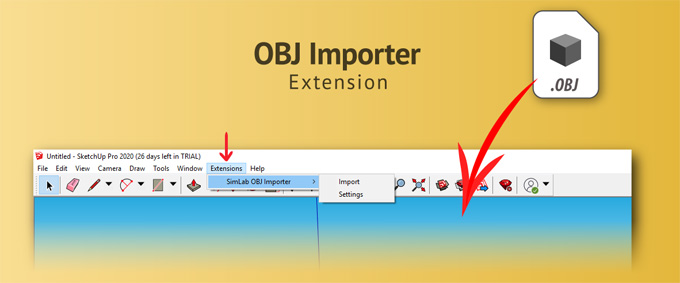
The SimLab OBJ importer plugin has been supported by the different versions of the SketchUp software, including SketchUp 8, SketchUp 2013, SketchUp 2014, SketchUp 2015, SketchUp 2016, SketchUp 2017, SketchUp 2018, SketchUp 2019, SketchUp 2020, SketchUp 2021, SketchUp 2022, SketchUp 2023, SketchUp 2024, SketchUp 2025 and SketchUp 2026. The SimLab OBJ importer plugin is compatible with both Mac and Windows operating systems. The supporting language for the SimLab OBJ importer plugin is English.
The SimLab OBJ importer extension helps to add a sharing feature to the SolidEdge application. It has been working as the middle layer between the SolidEdge application and the SimLab Composer application. With the help of this SketchUp extension, users are able to transfer their SolidEdge scene into the SimLab Composer at any time during the SolidEdge session. This SketchUp extension also enables users to share their designs in the OBJ format. The SimLab OBJ importer plugin allows users to keep an active link to keep the data in sync across the SolidEdge and SimLab Composer. Thus, the users are able to avoid repeating work inside the SimLab Composer.
Learn about the design features of the SimLab OBJ importer for the SketchUp software
The SimLab OBJ importer plugin is known for its reliability to handle large design models, maintaining the design material accuracy and providing robust customisation features during the import procedure.
Robust material and texture handling feature
The SimLab OBJ importer plugin is able to import OBJ design models along with the design materials and textures intact. The SimLab OBJ importer plugin helps to map the colours, textures, normals and texture coordinates accurately, which helps to ensure that the design model will appear in the SketchUp software as it was designed, thus helping to reduce the requirement for a manual re-texturing process. The SimLab OBJ importer plugin can also handle MLT files effectively, which helps to bring diffuse colours, texture maps and design transparency.
Advanced import transformation and scaling feature
The SimLab OBJ importer plugin offers a dedicated dialog box, which helps to customise the importing process of the design model, along with addressing the common issues with scales and orientation. With the help of the Up Vector Adjustment feature of the SimLab OBJ importer plugin, users are able to correct the design orientation. The Scale Factor feature of the SimLab OBJ importer plugin enables users to define a scaling multiplier to match the SketchUp units to the source model’s scale. The rotation options of the SimLab OBJ importer plugin help to rotate the design models upon import.
Integration and design workflow feature
After installing the SimLab OBJ importer plugin, it can be directly integrated into the SketchUp Extensions menu, which helps to offer a seamless design workflow. The SimLab OBJ importer plugin can work by allowing the design professionals to select the .obj file, which helps to utilise the corresponding .mtl and texture images in the same folder.
High-quality mesh handling feature
The SimLab OBJ importer plugin has been designed to handle the large and complex design models, which helps to make it suitable for designing products, making architectural visualisations and creating 3D scenes along with high polygon counts. During the import process, the SimLab OBJ importer plugin helps to maintain the high-quality design outputs, thus helping to ensure that the design model is usable within the ecosystem of the SketchUp software.
Compatibility feature
The SimLab OBJ importer plugin supports different SketchUp versions on both MacOS and Windows. The professional license for the SimLab OBJ importer plugin allows the installation on two different machines.
How to install the SimLab OBJ importer for the SketchUp software
To install the SimLab OBJ importer plugin for the SketchUp software, users have to follow several steps. At first, the user has to download the SimLab OBJ importer plugin from the SketchUp Extension Warehouse or from the SimLab Website.
In the SketchUp software, the user has to go to the Window, click on the Extension Manager option, and they have to click on the install extension button. After that, the user has to select the downloaded file and restart the SketchUp software.
To learn more, watch the following video tutorial.
Video Source: TutorialsUp
Download SimLab OBJ importer
In the next step, the user has to go to the SimLab tab or menu to start the importing process of the .obj files. Thus, the SimLab OBJ importer plugin has been activated and is ready to use. This plugin offers a 21-day or 30-day free trial license to the users, which can be managed in the settings.