What's new in Profile Builder 3 for SketchUp?
Concept about the Profile Builder 3 extension for the SketchUp software
The Profile Builder 3 extension is one of the fastest and most responsive sets of parametric modelling tools for the SketchUp software. The Profile Builder 3 extension enables users to model faster than ever before. This SketchUp extension also helps to make the design model smarter and make sure that the design model changes are adaptable.
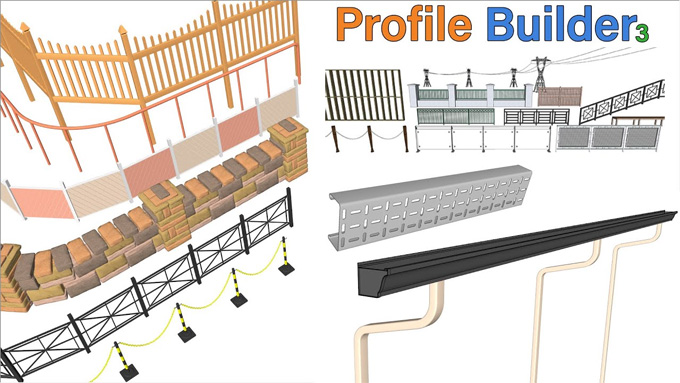
The Profile Builder 3 extension has the capability to create smart emissions of profile members by using its parametric profiles. With the help of the Profile Builder 3 extension, the profiles can be of any shape or even a polyline. This SketchUp plugin is also able to generate smart mouldings, for example, piping, framing, railings, walls, roofing, and foundations. As a result, there are lots of possibilities in the design model. Lots of new features have been added in the latest version of the Profile Builder 3 extension, which are designed to help users to create smart profiles within the SketchUp software.
The Profile Builder 3 extension is compatible with the different versions of the SketchUp software, including SketchUp 2022, SketchUp 2023, SketchUp 2024, SketchUp 2025 and SketchUp 2026. The Profile Builder 3 extension is compatible with both Mac and Windows operating systems. There are numerous supporting languages for the Profile Builder 3 extension, which are Traditional Chinese, Brazilian Portuguese, Dutch, Italian, French, Japanese, Russian, Korean, Spanish, German, and English.
Discuss the design features of the Profile Builder 3 extension
Auto assembler feature
This feature of the Profile Builder 3 extension helps to create an assembly based on the example object that has been done previously by the users. This Auto Assemble feature of the Profile Builder 3 extension can also create a multitude of different assemblies with just one click of a button. In this context, the users have to create the art that needs to be assembled. Then, the users have to select those arts and have to click the ‘Auto-assemble’ button to do the work.
Span assemblies feature
This feature has been anchored among the adjacent component parts, which allows sag, curve, etc. Fully customizable parametric smart assemblies can be created and saved successfully with the help of the Profile Builder Assembler.
Helps to build discontinuous
This feature of the Profile Builder 3 extension enables users to fix joints, in which the design objects turn into a single object, rather than just one continuous object and can also adjust if the profile follows around the curve or if it begins a new profile at the junctions.
Can build along multiple paths
The new version of the Profile Builder 3 extension is able to extrude profiles along multiple paths at one time. This extension can also handle any path in its way and also helps to maintain the expected orientation of the profile.
Live profile editing feature
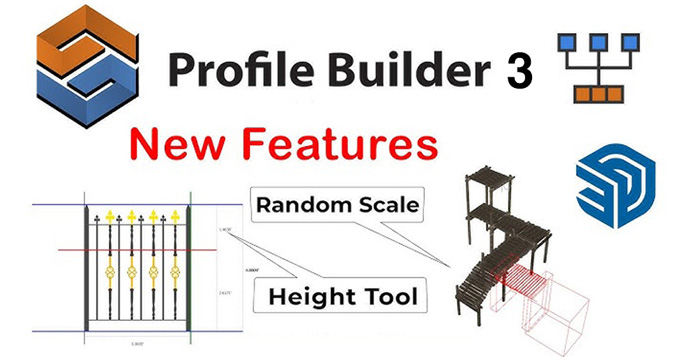
The Profile Builder 3 extension offers a live profile editing option, which enables users to select a profile and adjust it; as a result, all instances can be adjusted automatically without the need to go back and adjust them individually.
Hole tool
This Hole tool enables users to cut holes in their profiles that have been made previously. This tool can also cut through nested groups and components with ease, so the design object can be modified, and the holes will be regenerated in the proper location.
Can set the height of assemblies
The Profile Builder 3 extension can also set the height of various assemblies by entering a new value in the height box in the assembly dialog, so users can make quick height adjustments.
Post-editing tools
The Profile Builder 3 extension offers post-editing tools that help to edit any smart profile member or assembly.
Smart-path selection feature
The smart-path selection tool offered by the Profile Builder 3 extension helps to select a specific path of edges quickly among other complex geometries.
Split/edit complex member
This design feature enables users to split different parts of extruded profiles into their own objects.
Pricing of the Profile Builder 3 extension
There is a limited offer for using the Profile Builder 3 extension, which makes this SketchUp extension at just 39.50 US dollars. Users can use the license for a maximum of 3 years before switching to a paid license to get the full version of the Profile Builder 3 extension.
To learn more, watch the following video tutorial.
Video Source: mind.sight.studios
Download Profile Builder 3
Process of installing the Profile Builder 3 extension for the SketchUp software
To access the Profile Builder 3 extension, a license key is required. This license key is required for accessing the trial and commercial versions of the Profile Builder 3 extension. While installing the Profile Builder 3 extension, the user gets a confirmation email as soon as possible. This email contains the license information for accessing the Profile Builder 3 extension.