
How to Install Lumion LiveSync for SketchUp
Concept about the Lumion LiveSync for the SketchUp Software
The Lumion LiveSync plugin is a simpler, real-time rendering solution for design professionals, which helps to boost the design workflow of the SketchUp software. The Lumion LiveSync plugin helps to bring designs to life through its 3D visualisation process.
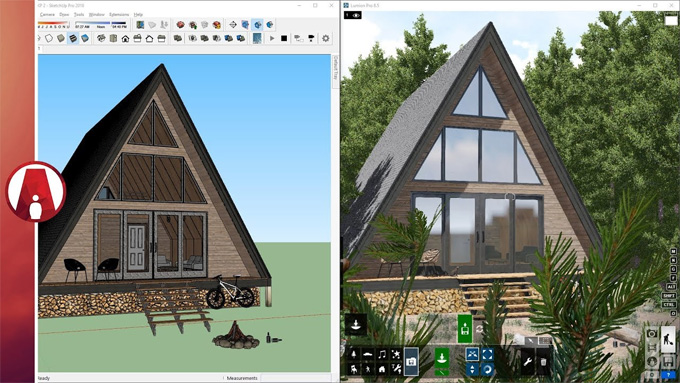
This SketchUp plugin also helps to offer ease of use and high-quality rendering for interior designs, architectural designs and landscape designs. There is a diverse content library and one-touch controls in the Lumion LiveSync plugin, which enable the design professionals to add design, context, and atmosphere to the visualisations, thus making those designs come alive.
The Lumion LiveSync plugin can seamlessly integrate with different types of CAD and 3D design modelling software, which allows real-time model and render updates. Nuemorus major design software, for example, Revit, SketchUp, Archicad, AutoCAD, Rhino and others have been supported by the Lumion LiveSync plugin.
The fast rendering speed of the Lumion LiveSync plugin allows users to quickly create stunning videos, images and 360 panoramas, which allows them to communicate their design ideas more effectively. A wide range of atmospheric and lighting settings has been offered by the Lumion LiveSync plugin, which helps to evoke different moods in designs. A powerful communication tool has also been offered by the Lumion LiveSync plugin, which enables users to showcase their designs along with emotion and realism.
The Lumion LiveSync plugin is compatible with different versions of the SketchUp software, including SketchUp 2024, SketchUp 2025, and SketchUp 2026. The Lumion LiveSync plugin is compatible with the Windows operating system. English is the supporting language for the Lumion LiveSync plugin for SketchUp software. The Lumion LiveSync plugin is free to install, and users can get a 14-day free trial of this plugin after conducting the installation process.
Discuss the design features of the Lumion LiveSync for the SketchUp software
Smoother design workflow
The rendering feature of the Lumion LiveSync plugin helps to create a model-to-render workflow, which is quick, productive, and stress-free, and creates 3D design models without sacrificing design quality over speed.
Real-time rendering feature
With the help of the Lumion LiveSync plugin, users are able to explore and test their design ideas in its realistic design environment. In addition, the users are also able to add design detailing, which helps to bring new design ideas to life without wasting time.
Design importing features
The Lumion LiveSync plugin offers seamless import options of native SketchUp (.skp) files. In the case of exporting a SketchUp model as a different file type, for example, .dwg, .dae or .fbx, the Lumion LiveSync plugin makes the importing process easy into one Lumion project.
Uses of the Lumion LiveSync software for the SketchUp software
The reason behind using the Lumion LiveSync extension for the SketchUp software is as follows:
1. The Lumion LiveSync plugin is able to create high-quality renders at any point during the design process.
2. The Lumion LiveSync plugin can also render any design model in real-time.
3. The Lumion LiveSync plugin helps in breathing beauty, texture, and realism into the design that has been made in the SketchUp software, along with the help of the 1,350-plus design Lumion materials.
4. The Lumion LiveSync plugin is able to generate different design concepts and real-life settings within a short time, with the help of 6,900-plus Lumion design items in its concept library.
5. The Lumion LiveSync plugin has been used to create high-quality images in minutes, and can also help to create videos in just a few hours.
6. With the help of the Lumion LiveSync plugin, users are able to create 360 panoramas, which help to make interactive design presentations and virtual reality.
7. By using the real-time engine of the Lumion LiveSync plugin, users are able to render large, complex models in a few times. This SketchUp extension is also intuitive enough for design professionals with limited rendering experience.
How to download the Lumion LiveSync extension for the SketchUp software
To install the Lumion LiveSync plugin for the SketchUp software, the users have to follow several steps, which are:
To learn more, watch the following video tutorial.
Video Source: Architecture Inspirations
Download Lumion LiveSync for SketchUp
1. At first, the users have to visit the official Lumion website or the app store for the modelling software, like SketchUp Extension Warehouse or Autodesk App Store.
2. In the website or app store, the user has to search for “Lumion LiveSync”, and then the user has to click on the install button.
3. In the next step, the user has to turn on the Lumion LiveSync plugin. After installing the Lumion LiveSync plugin, a toolbar has appeared in the modelling software of the user, which enables them to start the live connection.