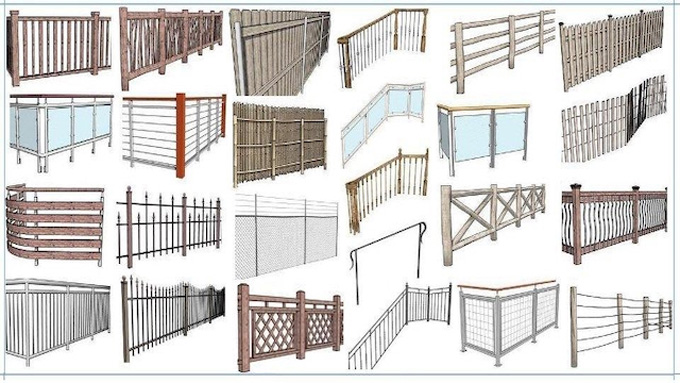
Download SketchUp Instant Fence and Railing Plugin
The instant fence and railing plugin is the SketchUp plugin, which involves the creation of railings and fences from a line or curve. The instant fence and railing plugin is compatible with different versions of the SketchUp software, for example, SketchUp 2022, SketchUp 2023, SketchUp 2024, SketchUp 2025, and SketchUp 2026.

The instant fence and railing plugin is compatible with both Mac and Windows operating systems. There are numerous languages that are supported by this SketchUp plugin, which include Spanish, English, French, Korean, and Brazilian Portuguese.
Learn about the design features of the instant fence and railing plugin for the SketchUp software
1. With the help of the instant fence and railing plugin, the users are able to place fencing, rails, pickets, bannisters, handrails, balcony railings or other types of fences on centre or at a chosen side textures, which will align with the fences and railings.
2. There are several options for extensions, volutes, handrail returns, brackets, and also options for panel clips or stops.
3. The metric or Feet / Inches Option is also offered by the instant fence and railing plugin, which helps to follow the terrain elevation.
4. In the libraries of the instant fence and railing plugin, there are about 300 preset styles organised. By using these preset styles, the users are able to create custom styles and also can save those styles along with images and icons interactive menu.
5. All the fences created by this SketchUp plugin can be modelled as 2D face me or 2D hide lines, or 3D.
6. The instant fence and railing plugin also has automatic quantity take-off features, and it can also offer a take-off history log.
7. The single-entry macro height adjustment feature of the instant fence and railing plugin also helps to in the adjustment of the heights of the fence and railings.
8. The instant fence and railing plugin also has the ability to create simplified terrains over complex terrains.
9. The terrain creation process by the Instant Fence and railing plugin is fast and simple, and there is no need to explode problematic terrain.
10. With the help of theinstant fence and railing plugin, the users are also allowed to drape a terrain over any design object or collection of design objects. Users can reduce the size of the file, thus reducing the time of creation of the SketchUp design model.
Discuss the key functionalities of the instant fence and railing plugin
➢ The instant fence and railing plugin has been designed to help users to create fence and railing designs within the SketchUp software.
➢ The instant fence and railing plugin also enables users to create many different kinds of fences and railings, for example, metal and wood fences, handrails, stair rails and others.
➢ The instant fence and railing plugin helps to generate a fence based on the style as per the selection of the users.
➢ The instant fence and railing plugin can follow curved and straight paths.
➢ With the help of the instant fence and railing plugin, the users are able to create many assemblies, which allows them to select which direction they face.
➢ The instant fence and railing plugin has the ability to pair with another of Chuck’s extensions, which helps to create many different kinds of railings.
➢ With the help of the instant fence and railing plugin, the users are also able to adjust the parameters of the different fencing pieces.
How to download the instant fence and railing plugin for the SketchUp software
To download the instant fence and railing plugin for the SketchUp software, the users have to follow several steps, which are as follows:/p>
In the case of downloading from the Extension Warehouse, the user has to open the SketchUp software, then they have to go to the Window option, and they have to open the SketchUp Extension Warehouse.
In this page, the user has to search for “Instant fence and railing plugin” and has to click on the install button. This step helps to add the Instant fence and railing plugin to the SketchUp software automatically.
In the case of downloading from Vali Architects, the user has to visit the Vali Architects script page, search for the Instant fence and railing plugin and click on the download button to download the plugin.
To learn more, watch the following video tutorial.
Video Source: Chuck Vali
Download Instant Fence and Railing
After downloading this SketchUp plugin, the user has to open the SketchUp software, go to the Window option and then they have to go to the Extension Manager option. After that, the user has to click on the "Install Extension" to select the downloaded file.