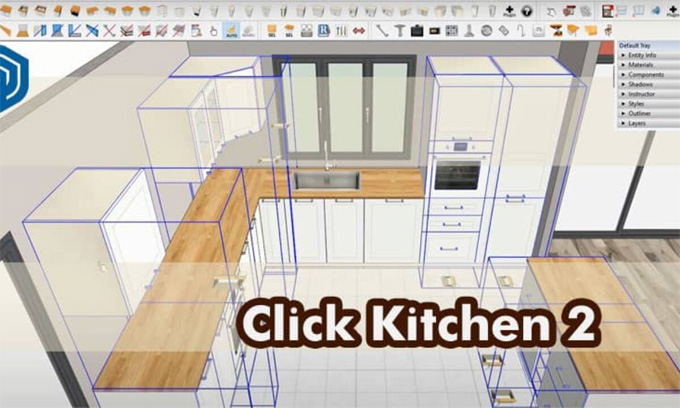

Download Click-Kitchen 2 (SKP Make/Pro)

The Click-Kitchen 2 plugin is one of the useful SketchUp plugins, which enables users to draw and customise the 3D kitchen model with the use of the smallest detail. Through this SketchUp plugin, users can design their dream kitchen within the SketchUp software quickly and easily.
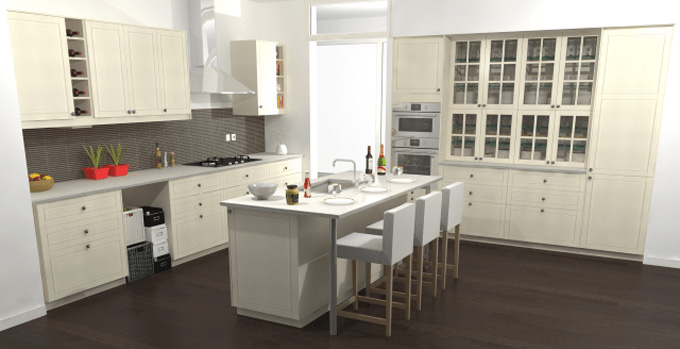
From selecting pre-designed countertops, kitchen cabinets, kitchen appliances, and accessories, and then customising these materials to fit into the kitchen design needs, has become easy with the Click-Kitchen 2 plugin. In a fraction of time, the Click-Kitchen 2 plugin will allow users to use traditional design methods, and thus, the user can create a professional-grade kitchen model in a fraction of time.
The Click-Kitchen 2 plugin is supported by the different SketchUp versions, which include SketchUp 2020, SketchUp 2021, SketchUp 2022, SketchUp 2023, and SketchUp 2024. The Click-Kitchen 2 plugin is compatible with both Mac and Windows. The supporting languages for the Click-Kitchen 2 plugin are French and English. The Click-Kitchen 2 plugin is available in the SketchUp Extension Warehouse.
The Click-Kitchen 2 plugin comprises over 5000 references of IKEA furniture along with several customised design options. With the help of the Click-Kitchen 2 plugin of the SketchUp software, users are able to draw a standard IKEA kitchen design along with millions of scopes or a custom-built kitchen with dimensions or materials.
Advantages of the Click-Kitchen 2 plugin
➢ The Click-Kitchen 2 plugin makes fast placement of the kitchen cabinets.
➢ The Click-Kitchen 2 plugin helps to produce clean and optimised SketchUp geometry.
➢ The kitchen design produced by the Click-Kitchen 2 plugin is ideal for the client's revisions.
➢ The Click-Kitchen 2 plugin for the SketchUp software is beginner-friendly and professional-ready.
➢ The Click-Kitchen 2 plugin can be used by the kitchen designers, architects, interior designers and also by the SketchUp professionals.
➢ With the help of the Click-Kitchen 2 plugin, the users are able to hide or show thumbnails, backsplashes, hooks or handles with just one click.
➢ The users are able to optimise their SketchUp files with automatic or manual cleaning modes of the Click-Kitchen 2 plugin.
Design features of the Click-Kitchen 2 extension for the SketchUp software
A wide range of design features has been offered by the Click-Kitchen 2 plugin, which helps to make the kitchen design as easy and intuitive as possible. The design features offered by this SketchUp plugin are as follows:
Offering Countertops
The Click-Kitchen 2 plugin has a variety of pre-deisgned countertops options. These countertop options are the inclusion of marble, granite, quartz and others in the kitchen model. With the help of the Click-Kitchen 2 plugin, users are able to create their own custom countertop. In addition, the users are also able to customise the size, shape and colour of the countertops to match their design requirements.
Appliances features
The Click-Kitchen 2 plugin offers several kitchen appliances, including ovens, dishwashers, refrigerators and others, which are pre-designed. The design of the users can be tailored to fit the size and placement of the different brands and styles of kitchen appliances. With this feature of the Click-Kitchen 2 plugin, users can easily and conveniently design a kitchen model layout which can meet the design needs of the users. The pre-designed kitchen appliances offered by the Click-Kitchen 2 plugin come with detailed instructions; as a result, users can easily install these kitchen appliances in their kitchen.
Accessories features
The Click-Kitchen 2 plugin also offers several kitchen accessories, for example, sinks, lighting fixtures, faucets and others.
Custom cabinets for the kitchen
With the help of the Click-Kitchen 2 plugin of the SketchUp software, users are able to create custom cabinets. In addition, the users are also allowed to select the kitchen cabinet design models from a variety of pre-designed cabinet models offered by the Click-Kitchen 2 plugin. The cabinet models can also be customised by the users to fit the design requirements, no matter what the size, shape or style of the cabinet.
How to download the Click-Kitchen 2 plugin for the SketchUp software
For downloading the Click-Kitchen 2 plugin for the SketchUp software, the users have to follow several steps, which are as follows:
1. At first, the users have to visit the SketchUp Extension Warehouse or the developer’s site to get the download link of the Click-Kitchen 2 plugin.
2. Then, the user has to click on the download button on the extension’s page. In this context, the users have to sign in to the SketchUp account.
To learn more, watch the following video tutorial.
Video Source: david Barros
Download Click-Kitchen 2
3. In the next step, the user has to use Extension Manager in the SketchUp software to install the downloaded .rbz file.
4. After completing the installation process, the users have to go to the View option and select the Toolbars in the SketchUp software to activate the Click-Kitchen 2 plugin.