
How to use the EngineeringToolBox Sketchup Extension

The Engineering ToolBox plugin helps to add standard and customised parametric engineering design components, including beams, flanges or function curves. The Engineering ToolBox plugin is compatible with Mac and Windows, and the supporting language for this SketchUp plugin is English. The Engineering ToolBox plugin can work with both SketchUp Make and SketchUp Pro. A wide range of free tools, calculators and information resources has been offered by the Engineering ToolBox plugin for the engineers and design professionals.

In addition, the Engineering ToolBox plugin also helps to provide detailed technical data and calculations for various fields, including fluid mechanics, HVAC systems, material properties, electrical engineering and others. The Engineering ToolBox plugin helps to perform common engineering tasks, for example, calculating the physical properties, designing systems like heating and water distribution, converting units and others.
A comprehensive tool has been offered by the Engineering ToolBox plugin for both students and design professionals in the technical and engineering fields. This SketchUp plugin is available in the SketchUp Extension Warehouse and is compatible with the different versions of the SketchUp software, including SketchUp 6, SketchUp 7, SketchUp 8, SketchUp 2013, SketchUp 2014, SketchUp 2015, SketchUp 2016, SketchUp 2017, SketchUp 2018, and SketchUp 2019.
Key features of the Engineering ToolBox plugin
The Engineering ToolBox plugin offers a wide range of engineering components, which are as follows:
➢ The Engineering ToolBox plugin offers several boards, including square-edged OSB boards - Imperial Units, square-edged OSB boards - Metric Units, square-edged plywood boards - Imperial Units and square-edged plywood boards - Metric Units.
➢ A wide variety of function curves has also been offered by the Engineering ToolBox plugin for the SketchUp software, which are Bezier Curve, Catenary Curve, Concentric Spiral, Circular - Spiral Curves, Cubic Equation, Ellipse, Exponential Function, Quadratic Equation - Parabola, Straight Line, Rectangular Hyperbola, and Trigonometric Functions.
➢ Several geometric figures are also offered by the Engineering ToolBox plugin, including bended rod, catenary curve, circular-spiral curve, bezier curve, cone, cube, cylinder - single wall, cylinder - double wall, ellipse, grid, line, polygon, plane - vertical, plane - horizontal, rectangular box, sphere, spurs, gears and others.
➢ The Engineering ToolBox extension also offers several HVAC design tools, for example, duct work - elbows, duct work - piping tools, duct work tees and others, which help to make the design of rectangular or circular ducts.
➢ The Engineering ToolBox extension helps to offer lumber or timber designs along with rectangular and solid beams and boxes, and I-joists.
➢ Several design components for piping and tubing systems have also been offered by the Engineering ToolBox extension for the SketchUp software.
➢ The property tool offered by the Engineering ToolBox extension helps to add property and land surfaces within the SketchUp design model.
➢ The stairs and ladders tool of the Engineering ToolBox extension helps to add parametric stairs and ladders in the design model.
➢ The structural and bar sections of the Engineering ToolBox extension offer numerous design components for steel and aluminium structures.
How to download the Engineering ToolBox extension for the SketchUp software
For downloading the Engineering ToolBox extension for the SketchUp software, the user has to follow several steps, which are as follows:
1. At first, the user has to open their SketchUp installation.
2. After that, the user has to select Window from the SketchUp menu and go to the Extension Warehouse, and then, they have to search for the “Engineering ToolBox”.
3. In the next step, the user has to click on the “install” button.
4. The Engineering ToolBox extension can be enabled or disabled from the SketchUp menu Window > Extension Manager.
5. The user may have to restart the SketchUp software to activate this SketchUp extension.
Process of using the Engineering ToolBox plugin for the SketchUp software
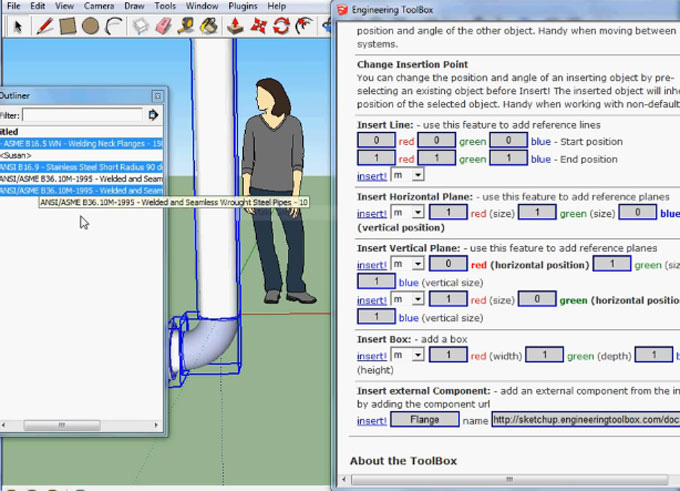
The Engineering ToolBox plugin can be used by the users by following several steps. After loading this SketchUp plugin, the users are able to navigate to the wanted component in the navigation menu, from which the user has to select the “insert” button to add the Engineering ToolBox extension to their SketchUp design model. Some component parameters, for example, colour, length, offset and others of the Engineering ToolBox plugin can be modified by the users before insertion.
In addition, the users are also allowed to insert the customised components' parameters of the Engineering ToolBox plugin in the dialog boxes at the end of the component lists, and this process can be done by clicking the “custom” option.
The users are also able to manipulate the selected objects in the design model from the tools section.
To learn more, watch the following video tutorial.
Video Source: engineeringtoolbox
Download The Engineering ToolBox
The assistant objects, for example, lines, vertical and horizontal planes can also be added in the SketchUp design model with the help of the Engineering ToolBox plugin of the SketchUp software.