Eclipse Gola Plugin for SketchUp
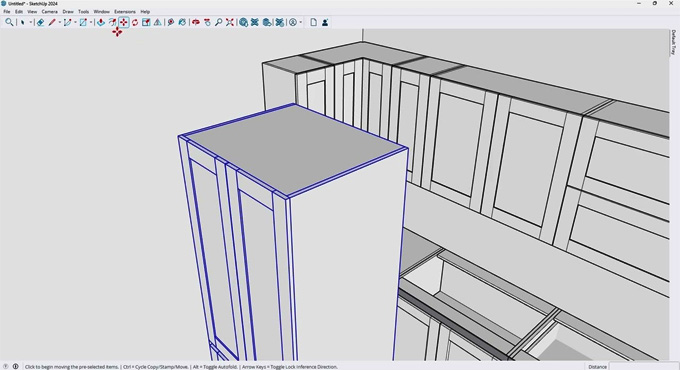
The Eclipse Gola plugin is one of the professional plugins for SketchUp software that has been developed to design handleless Kitchen cabinet designs within the SketchUp software. The Eclipse Gola plugin helps to generate designs of frameless cabinets along with integrated Gola channel profiles, including the modern handleless system in which an aluminium profile has been set in a recessed notch along the cabinet front edge. This design of the kitchen cabinet helps to eliminate the requirement for traditional handles.
The Eclipse Gola plugin helps to model the Gola channel exactly as it has appeared in the CNC production. With the help of the Eclipse Gola plugin, the visible 6mm aluminium L-profile and C-profile geometry has been rendered in silver material; as a result, the client can visualise the photorealistic results of the kitchen cabinets, and the underlying notch geometry will export cleanly to DXF for CNC programming.
The Eclipse Gola plugin is compatible with different versions of the SketchUp software, including SketchUp 2022, SketchUp 2023, SketchUp 2024, SketchUp 2025 and SketchUp 2026. The Eclipse Gola plugin is compatible with both Mac and Windows operating systems. The supported languages for the Eclipse Gola plugin are English, German, Italian, Spanish, French, Korean, Japanese, Russian, and Brazilian Portuguese. The user gets a 14-day free trial to access the design features of the Eclipse Gola plugin.
Learn about the design features of the Eclipse Gola plugin
Creating different cabinet types
The Eclipse Gola plugin helps to create 28 cabinet types within the SketchUp software. 10 types of base cabinets, for example, 1-door, 2-door, 2-drawer, 3-drawer, 1-drawer + 1-door, 1-drawer + 2-door, L-corner, sink base, diagonal corner, and blind corner, can be created with the help of the Eclipse Gola plugin. Around 7 types of wall cabinets can be created with the help of the Eclipse Gola plugin. In this case, the wall cabinets use a recessed deck system for the Gola grip area instead of side panel notches. Around 11 types of tall cabinets with pantry, oven housing, microwave + oven, utility (doors), utility (drawers), open shelving, fridge surround and mudroom can be created with the help of the Eclipse Gola plugin.
Smart editing feature
By using the Eclipse Gola plugin, users are able to edit any generated cabinet with a right-click on it. While resizing the cabinet designs, the user has to select the edges that will stay fixed; thus, the position and rotation of the cabinets in the design model are preserved automatically.
Producing different door styles
The Eclipse Gola plugin supports four types of door styles throughout all cabinets, for example, slab, raised panel, shaker and greensboro.
Customisation feature
The Eclipse Gola plugin offers different setting menus, including L-profile height and depth (default 56×39mm), C-profile height and depth (default 56×39mm) and Wall cabinet recess depth (default 27mm), which helps to make the Gola channel dimensions user-configurable.
Compatibility feature
The Eclipse Gola plugin helps to build drawer boxes along with Blum TANDEM and MOVENTO clearance specifications. In this case, the drawer box has been extended to the carcass front for full extension.
Offering production-ready outputs
The Eclipse Gola plugin helps to create a cut list along with a material breakdown by different categories. The Eclipse Gola plugin also helps to create a hardware list along with drawer slides, hinges, and gola profile length tracking features. The Eclipse Gola plugin also has a cost estimation feature, which helps to determine configurable per-square-meter and per-meter pricing of the cabinet models. The Eclipse Gola plugin is involved in the DXF export of the nesting layout along with full notch geometry, which will be ready for CNC programming.
How to download the Eclipse Gola plugin for the SketchUp software
To download the Eclipse Gola plugin for the SketchUp software, the user has to follow several steps, which are as follows:
1. At first, the user has to visit the SketchUp Extension Warehouse or has to go to the window then click on Extension Warehouse within the SketchUp software.
2. In the Extension Warehouse, the user has to type “Eclipse Gola” into the search bar within the Warehouse window.
3. After that, the user has to select the official Eclipse Gola plugin page by Eclipse Cabinetry.
4. In the next step, the user has to click the sign-in option at the top right if they are not logged in to their SketchUp account.
5. After that, the user has to click on the red Download button or Try it button.
6. To install the Eclipse Gola plugin, the user has to open the SketchUp software, navigate to the Window menu, and go to the Extension Manager in the top menu bar of the SketchUp software, and they have to click the Install Extension button that has been located at the bottom left of the Extension Manager window. After that, the user has to find and select the downloaded Eclipse Gola .rbz file from the local folders, and they have to click the Open or Install button. The user has to accept any security prompt to finish loading process of this tool into the workspace and thus complete the installation process of the Eclipse Gola plugin directly into the active SketchUp session.