How to Model Realistic Furniture with SketchUp
Discuss the top SketchUp plugins for creating furniture and cabinet designs
CabinetSense plugin
CabinetSense plugin is one of the useful plugins for the SketchUp software, which has been used for designing kitchen, bathroom cabinets or closets and also helps to export those designs for saw and CNC. The CabinetSense plugin is compatible with both Mac and Windows operating systems, and it has been available in different languages, such as English, German and Polish.
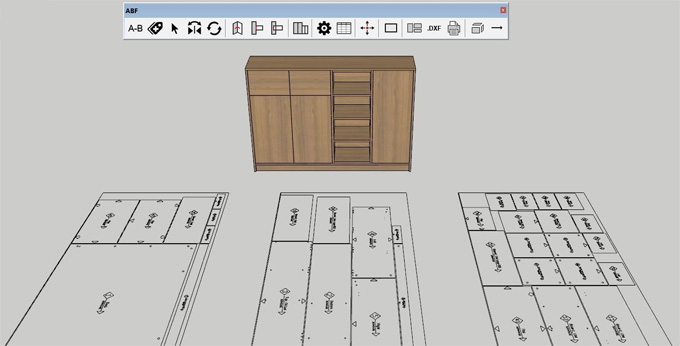
The CabinetSense plugin is compatible with the different versions of the SketchUp software, including SketchUp 2022, SketchUp 2023, SketchUp 2024, SketchUp 2025 and SketchUp 2026. By using the CabinetSense plugin, users are allowed to use the dynamic design components, create their own catalogue of cabinets or cabinet parts, and also add those designs to the SketchUp Component Browser.
With the help of the CabinetSense plugin, the user can also export bill of materials, finished doors or drawer reports. The CabinetSense plugin has come in three different versions: CabinetSense Essentials, CabinetSense Plus and CabinetSense Professional. The CabinetSense Essentials is good for the designers, the CabinetSense Plus has been used for traditional shops, and the CabinetSense Professional has been used for CNC processing.
CabMaker plugin
The CabMaker plugin is another important plugin for the SketchUp software, which helps to automate the creation of cabinetry and joinery designs. By using the CabMaker plugin, the user is able to turn the generic boxes into detailed designs of cabinets along with drawers, doors, and hardware models. In addition, the CabMaker plugin can also generate cut lists, which help to bridge the gap between a pretty picture and a buildable design. The CabMaker plugin is best for designing kitchens, bathrooms, custom millwork, and joinery detailing.
Fredo6 RoundCorner plugin
The Fredo6 RoundCorner plugin helps to create real-life design objects along with perfectly sharp edges. The Fredo6 RoundCorner plugin enables users to select the edges in the SketchUp software and fillet them along with a chosen radius. Thus, the users are able to make a table’s edges slightly rounder, or can provide a pillow with a softer edge.
Skimp plugin
The Skimp plugin enables the design professionals to import high-poly design objects, as well as to reduce the polygon count while preserving the appearance. With the help of the Skimp plugin, the interior designers can create a detailed chair model by simplifying it without visibly compromising the design. The Skimp plugin also enables the designers to replace the proxy objects along with the detailed designs later, which allows the designers to work with low-poly placeholders and swap in high-detail versions when ready to render.
1001bit Tools plugin
The 1001bit Tools plugin for SketchUp software is a collection of handy tools which help to automate several architectural modelling tasks. The 1001bit Tools plugin helps to generate staircase designs, which helps those projects that involve the multi-level space or a loft. The 1001bit Tools plugin also includes several design tools to create windows and door designs with a frame, and can also generate cabinetry carcasses. The 1001bit Tools plugin has been widely used by interior designers on a regular basis to speed up mundane tasks, for example, cutting holes for windows and adding railings on the stairs.
CleanUp³ plugin
With the help of the CleanUp³ plugin, the interior designers can create complex design models along with many imported design components, which can clutter the SketchUp file with hidden edges or unused items. The CleanUp³ plugin also helps to tidy up the design model, helps to remove the stray edges, merge redundant faces and purge unused design materials and components with a click. The CleanUp³ plugin helps to significantly reduce the size of the file, as well as helps to improve the overall performance of the SketchUp software.
Enscape plugin
By using the Enscape plugin, users are able to generate a high-quality render within a short time. The Enscape plugin can also navigate the design model as an interactive walkthrough at the click of a button. The Enscape plugin has been used by the interior designers to quick iterative design and can also move furniture designs in the SketchUp software.
The Enscape plugin also helps to support virtual reality, which allows users or clients to step inside the design with a VR headset. The user interface of the Enscape plugin is easy to use, which is used to generate good-looking results quickly.
To learn more, watch the following video tutorial.
Video Source: mind.sight.studios
Download SketchUp Furniture
Artisan plugin
The Artisan plugin helps to turn the SketchUp software into a basic sculpting program. The Artisan plugin helps to create organic shapes. Subdivision and smoothing tools offered by the Artisan plugin help to take a blocky model and refine it into a smooth, curved form. In the interior designs, unique decorative sculpture, draped curtains, a bed with rumpled blankets or other design models have been created by the Artisan plugin.