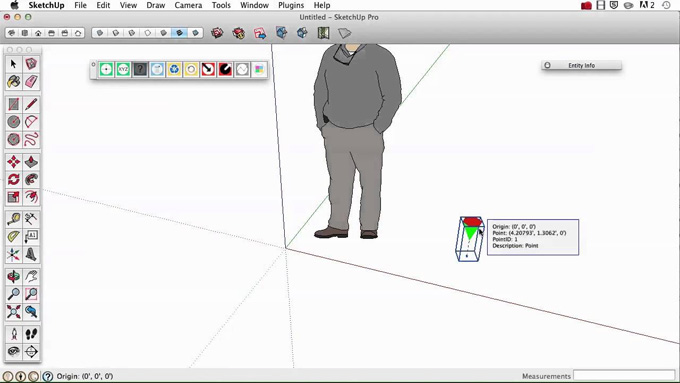
Point Gadget 2 (2016+) Plugin for the SketchUp Software
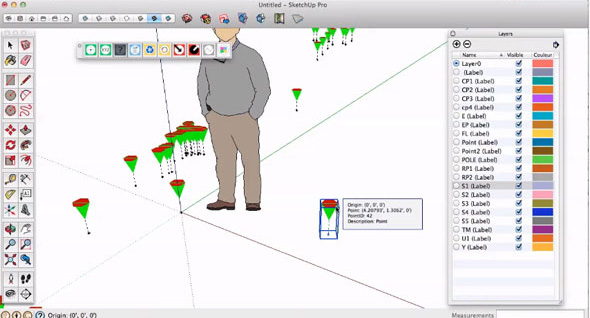
The Point Gadget 2 (2016+) plugin is the newest plugin for the SketchUp software, which is available in the SketchUp Extension Warehouse. The Point Gadget 2 (2016+) plugin is the upgraded version of the Point Gadget. The Point Gadget 2 (2016+) plugin contains a wide range of design toolsets for the creation of the point. With the help of the Point Gadget 2 (2016+) plugin, the users are able to import, create, visualise and export points.
The Point Gadget 2 (2016+) plugin is compatible with the different versions of the SketchUp software, for example, SketchUp 2016, SketchUp 2017, SketchUp 2018, SketchUp 2019, SketchUp 2020, SketchUp 2021, SketchUp 2022, SketchUp 2023, SketchUp 2024, SketchUp 2025 and SketchUp 2026. The Point Gadget 2 (2016+) plugin is compatible with both Mac and Windows operating systems. The supporting language for the Point Gadget 2 (2016+) plugin is English.
Discuss the key design features of the Point Gadget 2 (2016+) plugin for the SketchUp software
Importing and exporting feature
The import point feature offered by the Point Gadget 2 (2016+) plugin enables users to import points, which have been represented in a CSV file.
The export points feature enables users to export the point marker information as points in a CSV file for use in other types of hardware or software.
Point and geometry creation tools
With the help of the point and geometry creation tools of the Point Gadget 2 (2016+) plugin, users are able to set the location. In this context, the user has to go to the Extensions menu, then click on the PointGadgetv2 and then set the origin. Thus, this design tool can set the XYZ of the station location or the origin of the design model.
The shoot tool of the Point Gadget 2 (2016+) plugin has been used to place the point markers with the mouse.
The XYZ tool of the Point Gadget 2 (2016+) plugin helps to place the point markers one at a time by using specific XYZ coordinates.
The convert construction point of the Point Gadget 2 (2016+) plugin helps to convert the selected SketchUp construction points into the point marker symbols.
Offering line creation tools
With the help of the line creation tool of the Point Gadget 2 (2016+) plugin, users are able to create linework among point markers following the identical feature or description label.
Information viewers feature
The Point Gadget 2 (2016+) plugin also offers an information viewer feature for the design professionals. The inspector tool offered by the Point Gadget 2 (2016+) plugin helps users to visualise the XYZ location, point ID and the feature/description information of the point marker. In this case, the user has to turn on the tool and has to hover over a Point Gadget point marker. The reporter tool offered by the Point Gadget 2 (2016+) plugin has been applied to create a webdialog comprising a list of Point Gadget point marker information.
Offering modification tools
The modification tools of the Point Gadget 2 (2016+) plugin help to offer a conversion tool, which can easily transform the SketchUp construction points into point markers. The modification tools of the Point Gadget 2 (2016+) plugin also offer an update tool, which helps to revise any point markers with information that has been modified by hand. The update tool can also attribute the point gadget attribution automatically.
Reporting tools
The reporting tools of the Point Gadget 2 (2016+) plugin also offer inspection points and the points report feature. The Point Gadget 2 (2016+) plugin can hover over a point marker along with the inspect point feature that has been activated, to get its specific point information. The Point Gadget 2 (2016+) plugin can also generate a points report of a selection or of the entire collection of the point markers.
How to install the Point Gadget 2 (2016+) plugin for the SketchUp software
To install the Point Gadget 2 (2016+) plugin for the SketchUp software, the user has to follow several steps, which are as follows:
1. At first, the user has to download the .rbz extension for the Point Gadget 2 (2016+) plugin.
2. After that, the user has to open the SketchUp software, navigate to the Window and has to click on the Extension Manager.
3. In the Extension Manager, the user has to click on the install extension button to install the Point Gadget 2 (2016+) plugin for the SketchUp software.
4. After completing the installation process, the user has to navigate to the .rbz extension file that has already been downloaded, and then the user has to select this file.
To learn more, watch the following video tutorial.
Video Source: SketchUp Helper
Download Point Gadget 2
5. In the next step, the Point Gadget 2 (2016+) will appear in the Extensions Menu of the SketchUp software, which allows users to use the design tools of the Point Gadget 2 (2016+) plugin.