SketchUp PlaceMaker - A SketchUp Extension and Instant 3D Cities
Learn about the PlaceMaker plugin for the SketchUp software
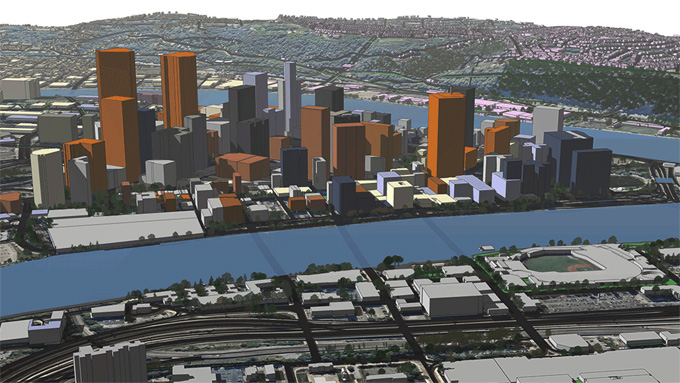
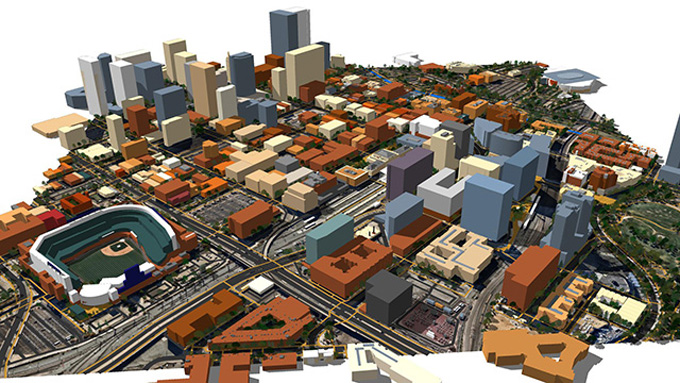
The PlaceMaker plugin helps to create 3D modelling designs in the SketchUp software. The PlaceMaker plugin helps to import the aerial images, design models, a variety of 3D data, and unique geographical features into the SketchUp software. The PlaceMaker plugin is one of the quick and easy-to-use SketchUp plugins. The PlaceMaker plugin helps to bring in detailed 3D cities from around the world.
The PlaceMaker plugin is compatible with the different versions of the SketchUp software, including SketchUp 2021, SketchUp 2022, SketchUp 2023, SketchUp 2024 and SketchUp 2025. The PlaceMaker plugin is compatible with both Mac and Windows operating systems. The supporting languages for the PlaceMaker plugin are English, German, Spanish, Italian, Dutch, French, Brazilian Portuguese, Simplified Chinese, Russian, Korean, Traditional Chinese and Japanese.
Discuss the key design features of the PlaceMaker plugin for the SketchUp software
Importing features
The PlaceMaker plugin helps to offer two sources of aerials: one is Mapbox, which helps to cover the entire planet, and the other is Nearmap, which helps to provide high-resolution aerials. The high-resolution aerials of the PlaceMaker plugin have the quality of sharp imagery, which helps to create major world cities' designs. The 3.5cm resolution of Nearmap and the recency of the PlaceMaker plugin help to create superb design models and presentations.
Exporting features
With the help of the export feature of the PlaceMaker plugin, users are able to export the design model into the Revit software.
Creating 3D buildings
The PlaceMaker plugin enables users to insert 3D building massing models to select the location and cities for the design.
Creating trees and forest designs
The PlaceMaker plugin also allows users to import entire forests with just one click and place the trees or forest models on terrain.
Creating 3D roads and paths
With the help of the PlaceMaker plugin, the users are able to place 3D roads, paths, walks and water into the design model. Thus, all design objects are modelled and become render-ready.
Can model on terrain
The PlaceMaker plugin helps to model and drape the buildings, 3D paths and roads into the terrain directly.
Creating instant site-based files
The PlaceMaker plugin helps to create instant site-based files that have been used for designing, modelling, and rendering processes.
What are the advantages of the PlaceMaker plugin in the SketchUp model?
Creating 3D cities and infrastructure within a short time
By using this SketchUp plugin, 40 hours of design work can be completed in just 4 minutes by the users. The user can also use the PlaceMaker plugin more easily and quickly. The users are allowed to import 3D-based building massing, walk surfaces, and roads along with high-quality aerials, water, tree and other design models. Thus, this SketchUp plugin helps to provide global data for cities and towns throughout the world to the users.
Creating a terrain of high quality
The PlaceMaker plugin enables users to access the high-quality terrain from Cesium. This high-quality terrain helps to provide a new level of perfection and granularity to the terrain model. The resolution of the terrain depends on the basis of the locations. With the help of the granularity to terrain model, the users are also able to drape 3D base design models, roads, aerials and infrastructures upon the surface of the terrain.
Helps to create 3D texture-mesh cities
The PlaceMaker plugin helps to create high-quality 3D-based meshes and textures of towns and cities at a lower price. These 3D texture-mesh city models are available in both SketchUp and FBX format.
Able to conduct a perfect survey with its AI-generated features
The PlaceMaker plugin enables users to digitalise the world along with its artificial intelligence feature. The PlaceMaker plugin also offers SmartSite, which allows users to take high-quality aerials and transform these into the perfect site plans. This site plan includes walks, paths, roads, parking areas, sports fields, highways, bridges, lawns, open spaces and design elements.
How to download the PlaceMaker plugin for the SketchUp software?
To download the PlaceMaker plugin for the SketchUp software, the user has to follow several steps, which are:
To learn more, watch the following video tutorial.
Video Source: Daniel Tal
Download PlaceMaker
1. The user has to visit the SketchUp Extension Warehouse or the PlaceMaker Website to create an account and download the PlaceMaker plugin.
2. After that, the user has to search for the PlaceMaker plugin and click on the download or install button on the listing page.
3. The user needs to log in to the Extension Warehouse, which will automatically download the PlaceMaker plugin.
4. In the case of downloading the .rbz file from the website, the user has to open the SketchUp software, navigate to the Extensions, go to the Extension Manager, then has to click on the Install Extension button and finally has to select the downloaded file.