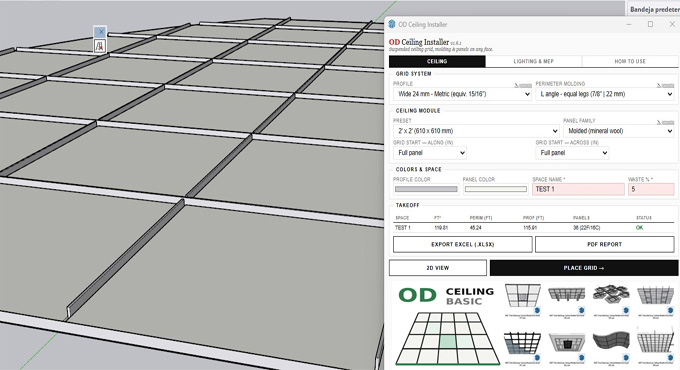
OD Ceiling Installer Pro Plugin for SketchUp Software
The OD Ceiling Installer Pro plugin for SketchUp software has been used to create suspended ceiling grids along with tees, moulding, MEP fixtures, panels and a full material takeoff that can be exported to PDF and Excel formats. In the case of clicking on the ceiling face, the OD Ceiling Installer Pro plugin can generate the entire suspended ceiling system design within the SketchUp software. The OD Ceiling Installer Pro plugin can turn any ceiling face into a proper suspended ceiling system along with just three clicks. The OD Ceiling Installer Pro plugin can work in the design of L-shaped rooms, rectangular rooms and irregular footprints, thus clipping every panel and profile to the room boundary.
The OD Ceiling Installer Pro plugin is compatible with different versions of the SketchUp software, including SketchUp 2022, SketchUp 2023, SketchUp 2024, SketchUp 2025 and SketchUp 2026. The OD Ceiling Installer Pro plugin is compatible with both Mac and Windows operating systems. The supported language for the OD Ceiling Installer Pro plugin is English.
How the OD Ceiling Installer Pro plugin works
To use the OD Ceiling Installer Pro plugin, the user has to open the panel, has to pick the grid system and module, then they has to name the space and also has to set a waste %. In the next step, the user has to click PLACE GRID, then the user has to click on the ceiling face. After that, the user has to place the fixtures from the Lighting & MEP tab within the design model. After that, the user can export the Excel and PDF report.
Learn about the design features of the OD Ceiling Installer Pro Plugin
Ceiling grid creation feature
The OD Ceiling Installer Pro plugin helps to support the standard metric and imperial suspension profiles and model dimensions.
Grid start control feature
The OD Ceiling Installer Pro plugin also allows users to set grid start points per axis and can also select whether rows begin along with half- or full-sized panels with boundaries.
Lighting and MEP design feature
The OD Ceiling Installer Pro plugin helps to place downlights, fire protection equipment, and troffers on the ceiling model. With the help of the OD Ceiling Installer Pro plugin, the user can replace the panels along with an automated and precisely sized cutout.
Perimeter handling feature
The OD Ceiling Installer Pro plugin can also generate the perimeter mouldings automatically along with more precise mitres and can accommodate non-standard room geometries and diagonal walls.
Tee trimming feature
The OD Ceiling Installer Pro plugin can also trim and rebuild the suspension tees automatically, which can intersect with the lighting and mechanical fixtures.
Parametric editing feature
The OD Ceiling Installer Pro plugin allows users to select an existing ceiling assembly and allows to alter the design parameters in the setup menu. Thus, users can redraw over the original footprint of the design model without starting from scratch.
How to download the OD Ceiling Installer Pro plugin for SketchUp software
To download the OD Ceiling Installer Pro plugin for SketchUp software, the user has to follow several steps, which are as follows:
1. First, the user has to visit the official page of the SketchUp Extension Warehouse, and they have to sign in with their Trimble ID. After that, the user has to purchase or subscribe to the license for using the OD Ceiling Installer Pro plugin and has to click on the download button to install this SketchUp plugin automatically.
2. In the case of the user downloading the .rbz file manually, the user has to go to the Window option, click on the Extension Manager within the SketchUp software, then they have to click on the Install Extension button and select the downloaded file.
Applications of the OD Ceiling Installer Pro plugin in the design industry
Used in the creation of grids
The OD Ceiling Installer Pro plugin has been used in the creation of drop-ceiling frameworks in different shapes, including L-shaped ceilings, rectangular ceilings, or irregular rooms for the construction project.
Used in the creation of component layouts
The OD Ceiling Installer Pro plugin of the SketchUp software has also been used by design professionals to create the design layout of edge moulding, panels and cross tees within the room boundaries.
Used in the material takeoffs
The OD Ceiling Installer Pro plugin also helps to generate the comprehensive lists of the required materials for the design project. In addition, the OD Ceiling Installer Pro plugin also helps to export the data straight to PDF or Excel formats for accurately estimating the materials.
Used in the MEP integration process
The OD Ceiling Installer Pro plugin has been integrated into the electrical, mechanical, and plumbing fixtures directly into the design layout of the ceilings.