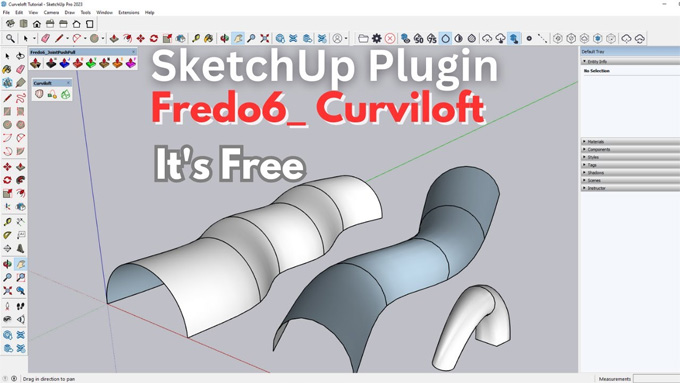
How to Model with Curviloft v1.2d with SketchUp - All Tools Explained
Concept about CURVILOFT v1.2d plugin
CURVILOFT v1.2d is one of the powerful plugins for the SketchUp software, which can create skins, lofts, and smooth surfaces by connecting contours. The CURVILOFT v1.2d plugin has become a favourite among the SketchUp users, who want to access advanced modelling design tools beyond the basics.
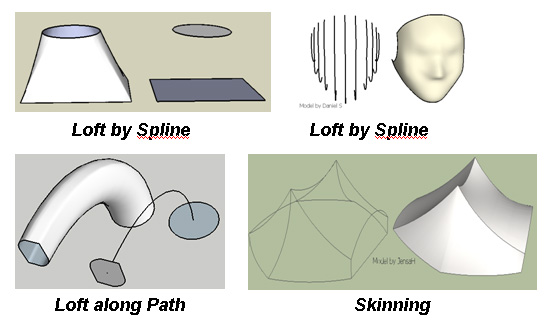
The CURVILOFT v1.2d plugin acts as the script that has been dedicated to lofting and skinning, which is the creation of design surfaces from contours. The CURVILOFT v1.2d plugin has three different modes, which are as follows:
➢Loft by spline: This mode of the CURVILOFT v1.2d plugin helps to join open or closed contours smoothly with the splines.
➢ Loft along the path: this mode of the CURVILOFT v1.2d plugin helps to create surfaces by following a path curve.
➢ Skinning: This skinning mode of the CURVILOFT v1.2d plugin helps to generate design surfaces bounded by 3 or 4 contiguous contours.
The CURVILOFT v1.2d plugin has been found on the Sketchucation website. This SketchUp plugin requires both the installation of the plugin file and LibFredo6, which contains essential functions, thus allowing the CURVILOFT v1.2d plugin to work.
Discuss the design features of the CURVILOFT v1.2d plugin for the SketchUp software
Generation of the complex surface
The CURVILOFT v1.2d plugin helps to enable the creation of organic surfaces, and it can be done by selecting different edges as paths. This helps to allow for intricate shapes.
Preview mode
The CURVILOFT v1.2d plugin has a preview mode, which helps to allow the users to visualise the design surface that has been created on the basis of the current settings.
Offering interpolation options
The CURVILOFT v1.2d plugin offers interpolation options, which allow users to customise the creation of the intermediate geometry. This interpolation option also includes the adjustment of the number of edges that have been created and modifying the curvature of the splines.
Providing support for open or closed shapes
The CURVILOFT v1.2d plugin can work with both open and closed profiles, which helps to enable the diverse modelling possibilities.
Flexible edge control feature
The CURVILOFT v1.2d plugin offers a flexible edge control feature, which is similar to the soap skin and bubble, which helps to generate design surfaces by adapting to boundaries. Thus, this CURVILOFT v1.2d plugin creates a better-ordered grid, which helps to align with the edges directly.
Generation of the contour line
The CURVILOFT v1.2d plugin can also produce the underlying contour lines, which have been used to generate the design surfaces.
What are the system requirements for the CURVILOFT v1.2d plugin?
The CURVILOFT v1.2d plugin has been available for users who have a paid license under Sketchucation SCFLicense. For the CURVILOFT v1.2d plugin, v14.3b or above version is required in the case of the LibFredo6. The free trial version of the CURVILOFT v1.2d plugin is available for 30 days from first usage. To get the perpetual license for the CURVILOFT v1.2d plugin, 15 US dollars is required. To get the Fredo6Bundle2022 license for the CURVILOFT v1.2d plugin, about 50 US dollars is required.
Compatibility of the CURVILOFT v1.2d plugin
The CURVILOFT v1.2d plugin is compatible with the different versions of the SketchUp software, for example, SketchUp 2017 and above. The CURVILOFT v1.2d plugin is compatible with both Windows and Mac operating systems. There are several supporting languages for the CURVILOFT v1.2d plugin, which are German, English and Spanish. The toolbars of the CURVILOFT v1.2d plugin are very easy to access.
Understanding the process of downloading and installing the CURVILOFT v1.2d plugin
The CURVILOFT v1.2d plugin has been released as the regular RBZ extension file on the Sketchucation Site. To download this RBZ file, the user has to use the red download button on the right side of the page. In this case, the user needs to log in to download the RBZ extension file. On the other hand, the user can also install the RBZ extension file within the SketchUp software via the SketchUp Extension Manager. After installing the CURVILOFT v1.2d plugin, the user will find this plugin under Tools > Fredo6 Collection > Curviloft.
To install this SketchUp plugin, there are two options, which are as follows:
The user has to unzip the files and has to copy Fredo6_Curviloft.rb and the Fredo6_Curviloft folder to the user's SketchUp plugins directory.
To learn more, watch the following video tutorial.
Video Source: Sketchup Style
Download Curviloft
In other respects, the user has to rename the zip file that they have downloaded to a .rbz file and install it via SketchUp Extension Manager.