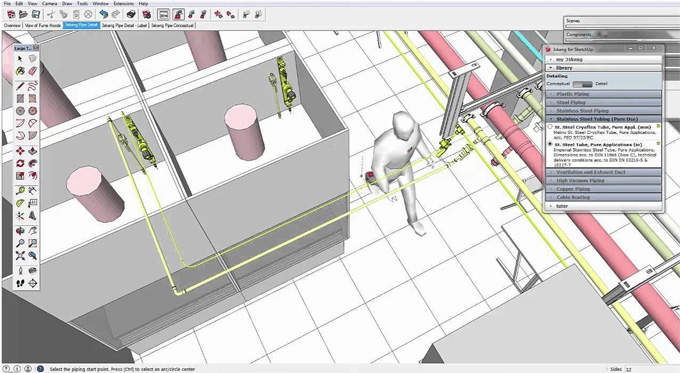
3skeng 2026 - 3D Engineering Software for Trimble SketchUp Plugin
Concept about the 3skeng plugin for the SketchUp Software
The 3skeng plugin is the 3D engineering plugin for the SketchUp software, which is intuitive and easy to use. The 3skeng plugin has been widely used for the design and documentation process in the 3D piping and steel structures. While designing, engineering or installing any piping work, steel work, or electrical tray mounting work has been done, the use of the 3skeng plugin can be the best choice for the design professionals. By adding the appropriate 3skeng design elements, the users are able to make a design component that is compatible with the 3skeng tools.
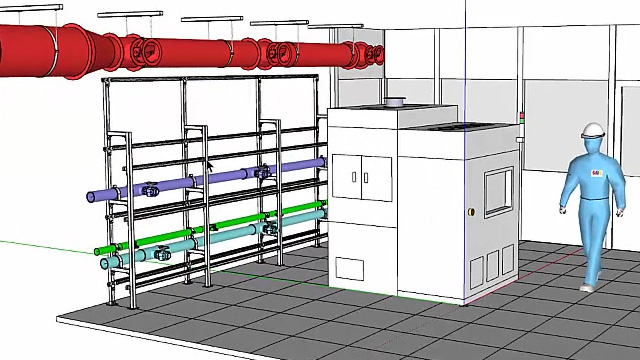
The 3skeng plugin is compatible with the different versions of the SketchUp software, including SketchUp 2023, SketchUp 2024 and SketchUp 2025. The 3skeng plugin is compatible with both Mac and Windows operating systems. The supporting language for the 3skeng plugin is English.
Discuss the design features of the 3skeng plugin useful in the 3D conceptual engineering designs
If the users have the active tool licenses for the demo and full version of the 3skeng plugin, then they can access the design features of this SketchUp plugin and can easily apply changes in the designs, create labels and can also create a bill of materials. The design features offered by the 3skeng plugin are as follows:
Controlled design interface
The controlled design interface of the 3skeng plugin helps to enable the users to access the design tools, libraries, settings, standards and comprehensive context-sensitive tutor. The 3skeng plugin supports the users by giving them the options to select and get detailed information as per their design requirements. The users are also allowed to add design tools, libraries, adjust the settings, select design standards or also can watch the design tutorials without interrupting the design workflow.
Editing and rotating feature
The 3skeng plugin enables users to modify the design models within a short time, which allows users to show the design changes and suggestions live in the meetings. This SketchUp design tool is intuitive, which helps to follow the design ideas of the users, and can use the magnetic points or can also input the numeric values in the familiar SketchUp way. The edit and rotate feature of the 3skeng plugin can work with the mount, pipe, steelwork and channel.
Labelling feature
The label tool of the 3skeng plugin enables users to add text labels to the group and design components. There are different adjustable parameters in the label tool, which allow individual adaptations to the particular label tasks. The users are also allowed to determine the position and distance of the labels during the automated alignment process. In addition, the future changes by using the label tool. The label tool of the 3skeng plugin can work with all 3skeng design elements.
Connection feature
The connect tool of the 3skeng plugin enables users to rearrange or copy the pipeline elements that have already been generated previously. The magnetic point feature enables users to connect the design elements exactly aligned to the centre and direction of the pipe. The Multicopy feature of the 3skeng plugin ensured that all selected design elements stayed glued to the mouse until the user pressed “Escape”. The connect tool of the 3skeng plugin can work with the 3skeng pipe, channel and mount.
List tool
The list tool of the 3skeng plugin is another powerful stand-alone tool, which helps to bridge the gap between the two worlds of SketchUp and Excel, thus helping to bring them together as one. By using the list feature, pipe, steelwork, mount and channel design can be accessed.
How to download and install the 3skeng plugin for the SketchUp software
To download the 3skeng plugin, the user has to follow several steps, which are as follows:
1. At first, the user has to visit the official 3skeng website or the SketchUp Extension Warehouse.
2. In the next step, the user has to select the operating system and can download the 3skeng installer/Ruby file.
To install the 3skeng plugin, the user also needs to follow several steps, which are:
1. At first, the user has to login on the computer as the user account. Next, the user had to select Extensions, then click on the Extension Manager, which helps to display the Extension Manager dialog box.
2. In the next step, the user has to click on the Install Extensions button, which displays the Open dialog box.
To learn more, watch the following video tutorial.
Video Source: 3skeng for SketchUp
Download 3skeng 2026
3. After that, the user has to locate the Ruby zip file to install the 3skeng plugin. Next, the user has to click on the Open button. After completing the installation procedure, the user has to quit and restart the SketchUp software.
4. After restarting the SketchUp software, the 3skeng toolbar has appeared.
5. The user has to open the “Extension Manager” dialogue box again and has to ensure that “3skeng Engineering 20xx” can be found in the list of extensions, and also that the button is set to ‘Enabled’.