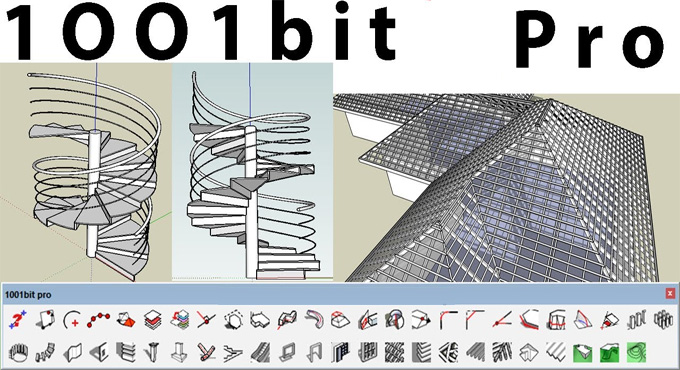
How to Install and Use 1001bit Tools Plugin in SketchUp
Concept of the 1001bit Tools plugin for SketchUp Software
The 1001bit Tools plugin is one of the most powerful plugins for the SketchUp software, which consists of numerous architectural modelling tools. The 1001bit Tools plugin allows design professionals to generate complex building design elements more accurately within a short time. There are numerous ready-made functions offered by the 1001bit Tools plugin, which help to create designs for stairs, windows, doors, roofs, trusses, walls, railings and other architectural elements.
The 1001bit Tools plugin has been widely used by architects, technical modellers and interior designers, as this SketchUp plugin can save hours of work and thus helps to improve the design production speed. The 1001bit Tools plugin consists of a set of parametric modelling commands, which help to generate specific architectural design elements.
With the help of the 1001bit Tools plugin, users are allowed to modify the width, height, thickness, spacing, materials, or other structural dimensions before creating the final design model. The design features of the 1001bit Tools plugin allow users to create accurate building components which follow real construction standards.
The 1001bit Tools plugin is compatible with different versions of the SketchUp software, for example, SketchUp 7, SketchUp 8, SketchUp 2013, SketchUp 2014, and SketchUp 2015. The 1001bit Tools plugin is compatible with both Mac and Windows operating systems. The supporting language of the 1001bit Tools plugin is English.
Understanding the key functionalities of the 1001bit Tools plugin for SketchUp Software
1. The 1001bit Tools plugin contains a GIANT collection of design tools, which help to create architectural elements.
2. The 1001bit Tools plugin comes with multiple tools that help to split lines, create chamfering edges, create guides and others.
3. The 1001bit Tools plugin comes with several options to create walls along with paths and tools, which enable design professionals to create openings in the walls. These tools also help to create windows and grilles in those openings.
4. With the help of the 1001bit Tools plugin, the creation of staircases becomes easy along with several different styles and options.
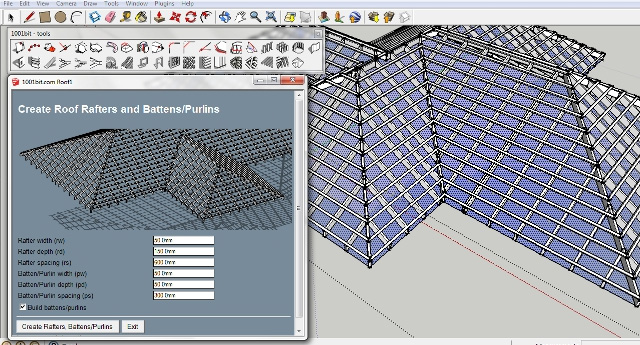
5. The 1001bit Tools plugin also offers several design features to create rafter and roof framing quickly.
6. The 1001bit Tools plugin also has a tool built in, which enables design professionals to create a hip roof directly from a face.
Learn about the design features of the 1001bit Tools Plugin
Parametric design features
Each design tool of the 1001bit Tools plugin has adjustable dimensions, which makes it perfect for creating construction-accurate designs. With the help of the 1001bit Tools plugin, users are able to create windows, stairs, and beams, which can match the real-world standards.
Used by architects and builders
The 1001bit Tools plugin helps to support real construction methods, which is perfect for making renovation plans, the architectural visualisation process and structural studies. As a result, the 1001bit Tools plugin has been widely used by architects and builders.
Save design time
With the help of the 1001bit Tools plugin, users are able to create clean and editable geometry with just one click. This feature significantly reduces the production time and helps to generate a design model within just a short time.
Providing clean and organised design output
The 1001bit Tools plugin can generate tidy geometry which are too easy to edit, dimension and export into documentation; thus, this SketchUp plugin helps to achieve clean and organised design output.
Provide a user-friendly interface
The design interface offered by the 1001bit Tools plugin is easy to use for beginners, as it provides clear menus and offers simple parameter inputs.
Download and installation process of the 1001bit Tools plugin for SketchUp Software
In the case of downloading the 1001bit Tools plugin for the SketchUp software, the user has to visit the SketchUp Extension Warehouse, search for the 1001bit Tools plugin, and click on the download button. In the case of getting the pro version of the 1001bit Tools plugin, the user has to download it from the 1001bit Official Website.
To install the 1001bit Tools plugin on Windows along with teh ZIP file:
1. The user has to download the 1001bit_pro(v2.x).zip file and extract the folder into the SketchUp plugin folder. After that, this file needs to be copied into the plugin folder of the SketchUp software
Process of using the 1001bit Tools plugin for SketchUp software
To use the 1001bit Tools plugin for the SketchUp software, the user has to follow several steps, which are:
1. At first, the user has to open the 1001bit Tools toolbar inside the SketchUp software.
2. On the basis of the design requirements, the design tools of the 1001bit Tools plugin need to be selected.
3. After that, the user has to enter their required dimensions and parameters.
4. In the next step, the user has to preview the design result, and then the has to confirm the design generation.
5. The users can also edit the geometry if needed, or they can repeat with new design parameters by using the 1001bit Tools plugin.