





- iSelect for Sketchup
- WalkAbout3d plugin for sketchup
- Shellify version 1.5 for sketchup
- designPH plugin with Sketchup
- AR Media plugin 2.2 for sketchup
- SoL-R plugin for sketchup
- Setup ruby plugins
extensions - SuperGlue for sketchup
- Grid Tool for sketchup
- Spread3D Review for
Sketchup - KeyShot Plugins for Sketchup
- Richsection Plugin for Sketchup
- Select n Isolate Plugin
- SKP5D converter for Sketchup
- Flattery plugin for Sketchup
- SU2CATT Converter for SketchUp
- Kubity plugin for sketchup
- Piranesi plugin for sketchup
- CutList 4.1 for sketchup
- Shaderlight Cloud Rendering

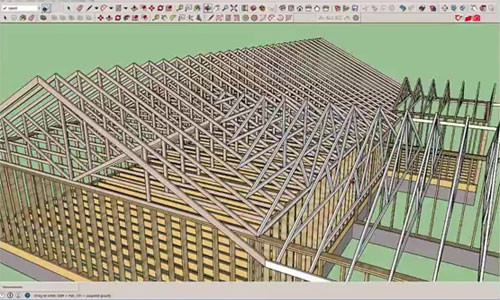
This is an exclusive sketchup tutorial focused on Medeek Truss Plugin. The tutorial shows how to use Medeek Truss Plugin for creating simple and complicated hip rafter roofs.
This sketchup plugin operates to generate perfect 3D truss geometry inside sketchup. Nathaniel P. Wilkerson is the developer of Medeek Truss Plugin for sketchup and it supports SketchUp 6, SketchUp 7, SketchUp 8, SketchUp 2013, SketchUp 2014, SketchUp 2015, SketchUp 2016.
Presently, the plugin can generate the following common truss types (Metric and US/Imperial):
• King Post (2/2) [with gable end option]
• Queen Post (4/2) [with gable end option]
• Fink (4/3) [with gable end and raised/energy heel options]
• Howe (4/4) [with gable end option]
• Fan (6/3) [with gable end option]
• Mod Queen (6/4) [with gable end option]
• Double Fink (6/5) [with gable end option]
With this sketchup plugin, the users will be able to produce a series of trusses by just choosing three points liable for creating the bounding rectangle (bldg. width x bldg. length) of the truss array. The number of trusses is automatically measured on the basis of the on center spacing and the building length.
With advanced options, it becomes easier to form sheathing, rake boards, fascia, blocking and outlookers. These options are presently accessible with the following truss types: Common, Attic, Monopitch, Scissor and Floor; and for the following rafter roofs: Gable, Gable with GLB and TJI with GLB.
With the Medeek Truss Plugin, the users can generate perfect drawing of the typical roof trusses inside SketchUp and authenticate all the architectural models.
We want to feature this page: sketchup4architect.com/sketchup-plugins
| |
All right reserved. All site content copyright Site Developed by GlobalAssociates |
 |